VELOCITY GLOBAL
Payroll Change Request Experience
Redesigning the payroll change request experience with a flexible, self-serve workflow to support 100% customer self-serve.
Overview
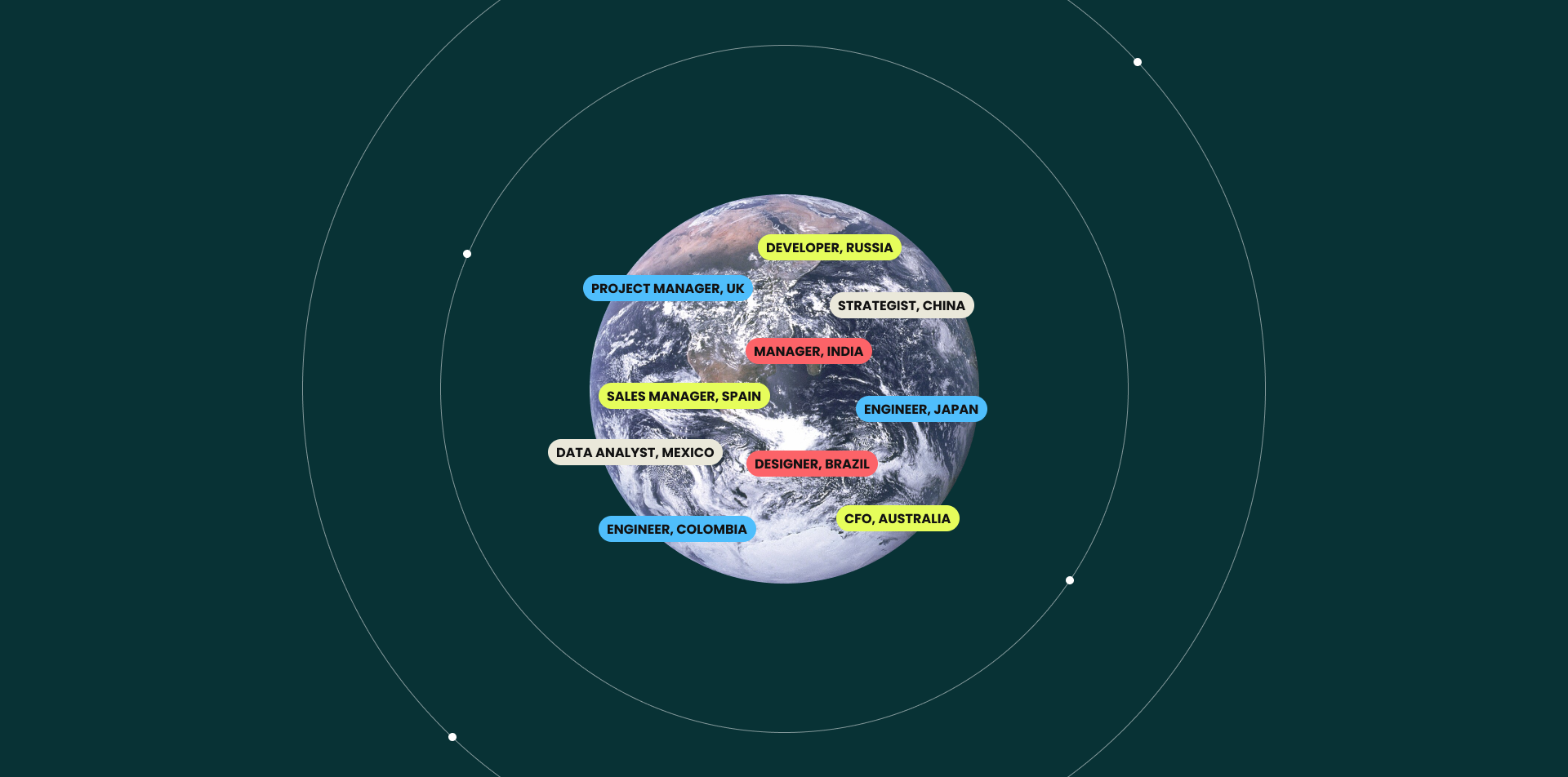
Velocity Global supports businesses in 185 countries to hire internationally and legally engage with employees across borders while ensuring compliance with country-specific regulations.
HR managers and company admins using the web platform could self-serve base salary change requests, but were frustrated that they couldn’t also update job titles and descriptions tied to these salary changes. This limitation also led to increased manual work for internal operations teams, requiring frequent back-and-forth communication to process these updates.
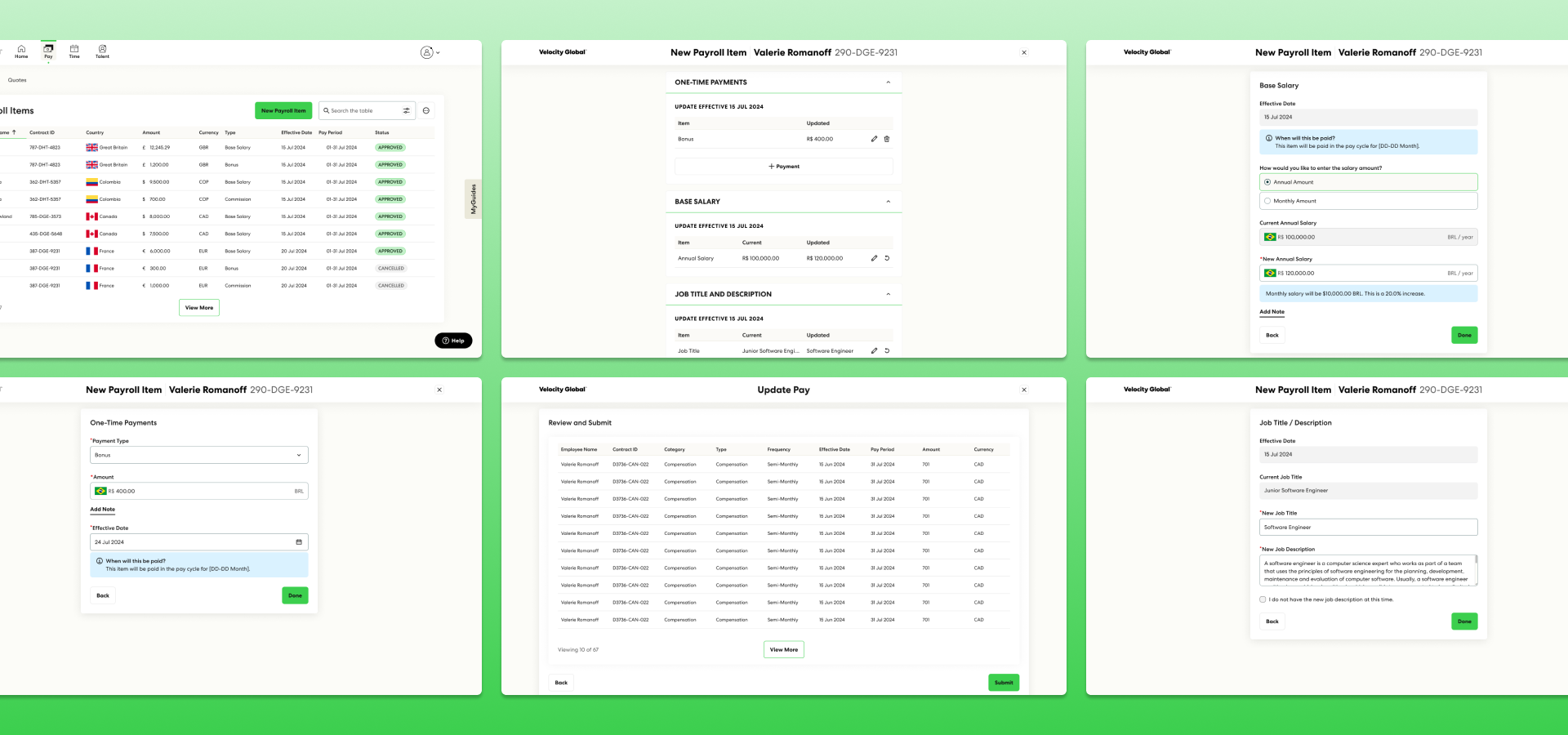
To align with Velocity Global’s goal of 100% customer self-serve, I was tasked with redesigning the payroll change request workflow to enable customers to submit all compensation-related updates including job title and description changes within a single request.
Discovery Workshop
I collaborated with my product manager to plan and facilitate a three-day virtual discovery workshop with key stakeholders from our product and engineering teams. Through structured discovery activities, we identified self-serve requirements for job title and description updates while also uncovering broader challenges related to payroll requests beyond job titles.
Defining Our Users
We first needed to understand the key users involved in the payroll change process. Our users fall into two main groups:
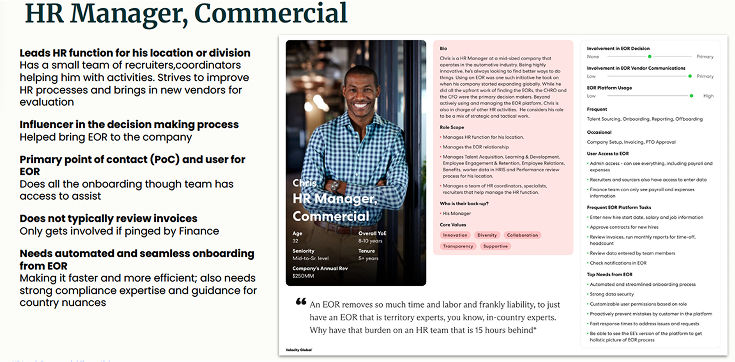
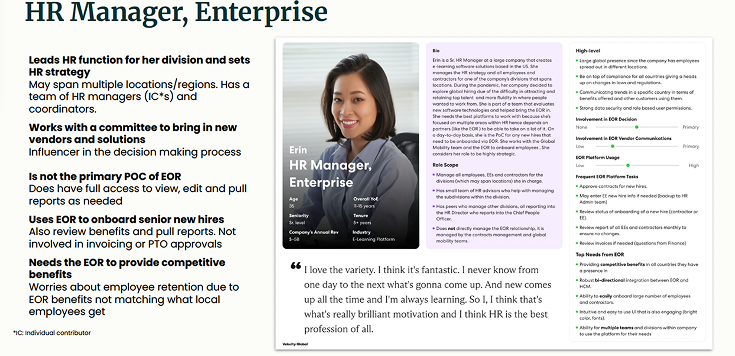
External - HR Managers and Company Admins
HR managers and Company Admins of customer companies that are using Velocity Global as their EOR. These users need to manage employee payroll for their company and submit payroll related change requests for their employees.
Submit payroll requests in the payroll item modal flow (Base Salary, One-Time Payments, and Allowances).
Do not have self-serve way to submit Job Title and Description changes within the GWP.
Must reach out to internal ops for Job Title and Description change requests.
Internal - Velocity Global Internal Operations
Internal team ops team members who manage and process payroll change requests.
Job Title and Description change requests require manual intervention.
Current process requires back and forth communication via email lacking automation.
There is no source of truth to track compensation requests outside of salary changes besides manual email communication.
Problem Alignment
After completing our workshop activities, we aligned on the key objectives for improving the payroll change experience. We identified the need for a self-serve solution that allows customers to submit all payroll item requests—including base salary, job title and description, and one-time payments—within a centralized, streamlined workflow.
A payroll request experience that supports:
Customer self-serve submission of all combos of payroll item requests (base salary, job title and description, one-time payments, and allowances).
In order to:
Centralize all compensation request types into a single, streamlined workflow.
Enhance efficiency in payroll change management.
Reduce manual workload for internal operations teams by minimizing support intervention.
So that customers can:
Efficiently submit all compensation related update requests without needing manual intervention.
Reduce back-and-forth communication with internal teams, saving time and effort.
Track and manage payroll requests in a transparent and organized manner.
Current State Usability Challenges
We then conducted a thorough review of the existing workflow to identify key usability challenges and areas for improvement.
Endless Scrolling & Poor Usability
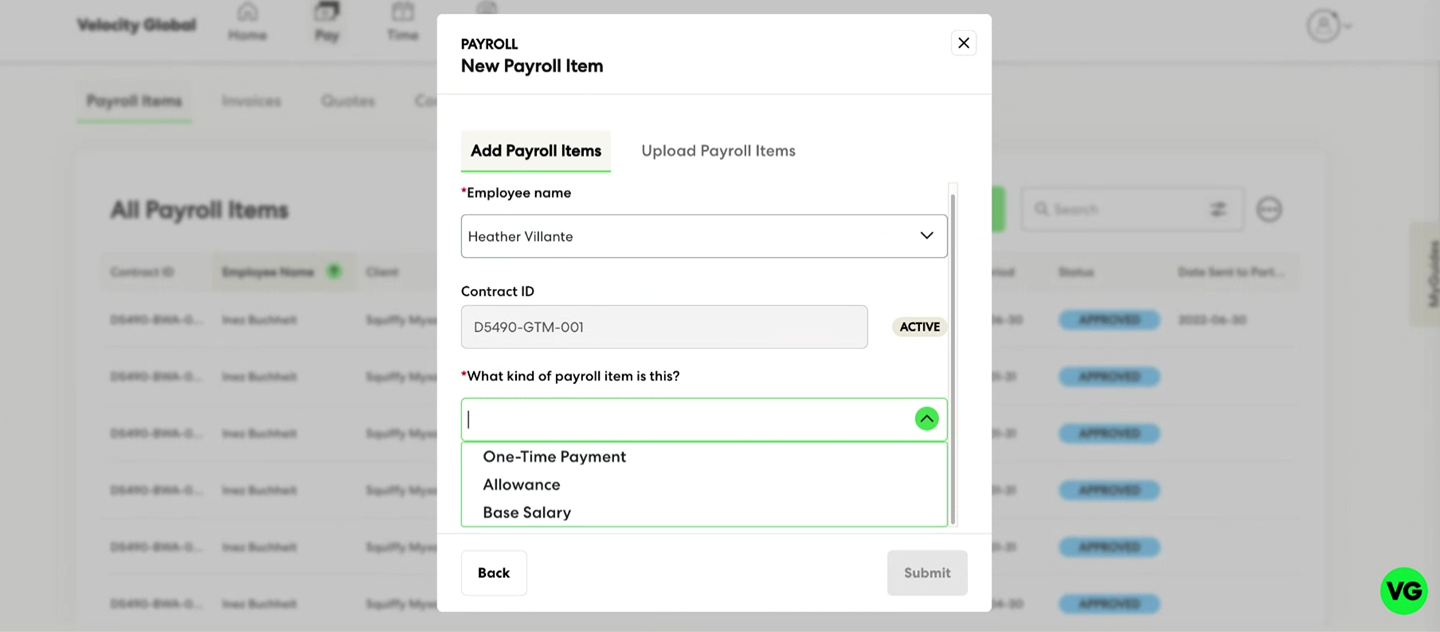
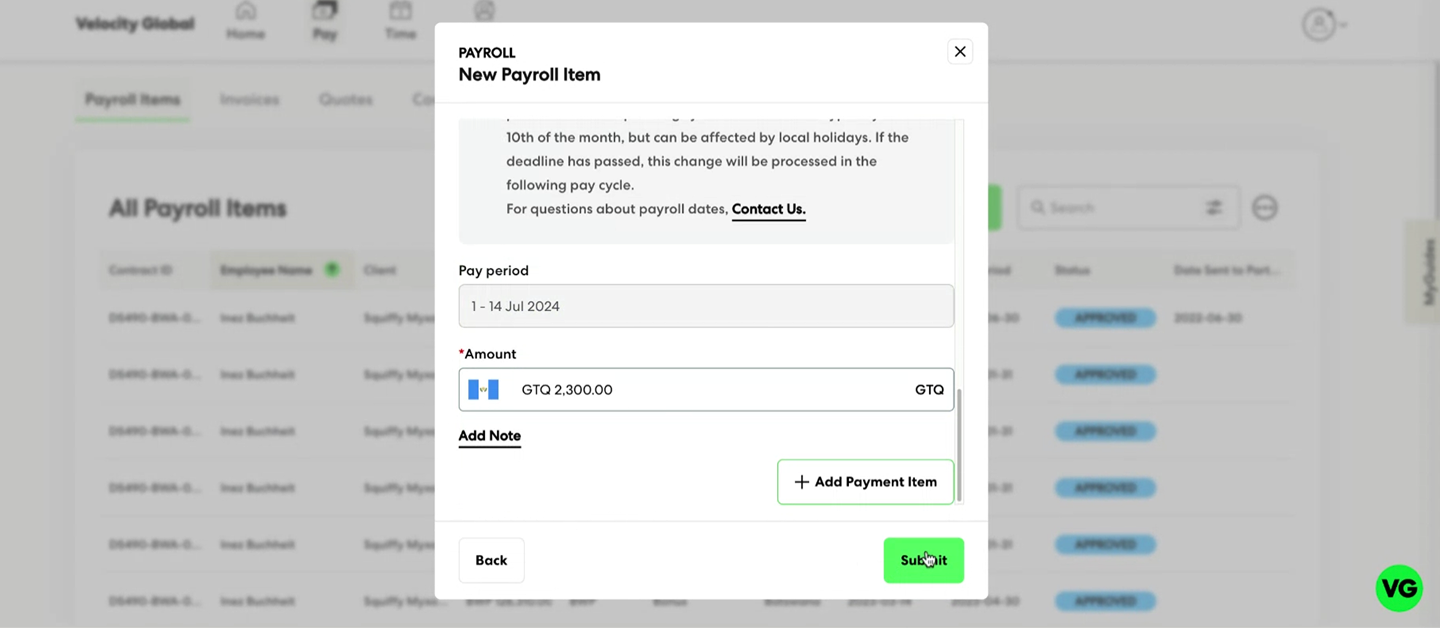
The original experience was housed in a small modal, forcing users to scroll extensively to review and input payroll changes. This led to a frustrating and inefficient experience, making it difficult to see the full context of their submissions at once.
Lack of Visual Hierarchy
All of the different payroll items in a request were presented in a flat, undifferentiated layout, making it difficult to distinguish between sections.
Cognitive Overload & Frustration
Without clear separation, users struggled to navigate, review, and complete payroll updates efficiently, leading to confusion and frustration.
Uncovering Additional Considerations
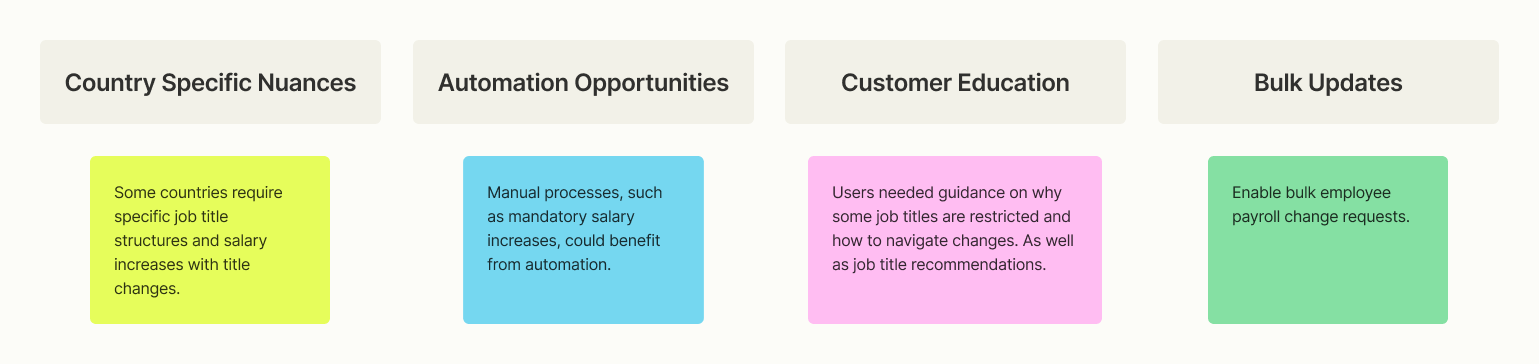
We also performed a brainstorming exercise to ensure we had a full understanding of the challenges surrounding job title and salary changes. While our primary focus was on self-serve job title updates, we uncovered additional complexities that could impact payroll workflows. While these challenges were out of scope for the MVP, they helped us refine our focus and prioritize core functionality that would provide the highest immediate impact: enabling customers to self-serve job title and salary updates within a structured, flexible workflow. These insights also informed future roadmap discussions, ensuring long-term scalability of the solution.
Design Approach
I defined a design approach that prioritized clarity, efficiency, and autonomy. Our goal was to reduce friction in the payroll change process while ensuring a seamless self-serve experience.
Principles
Clarity → Reduce cognitive load with better sectioning and visual hierarchy.
Efficiency → Minimize scrolling and streamline the submission process.
Autonomy → Allow users to navigate payroll updates without rigid constraints..
Shifting to a full page modal
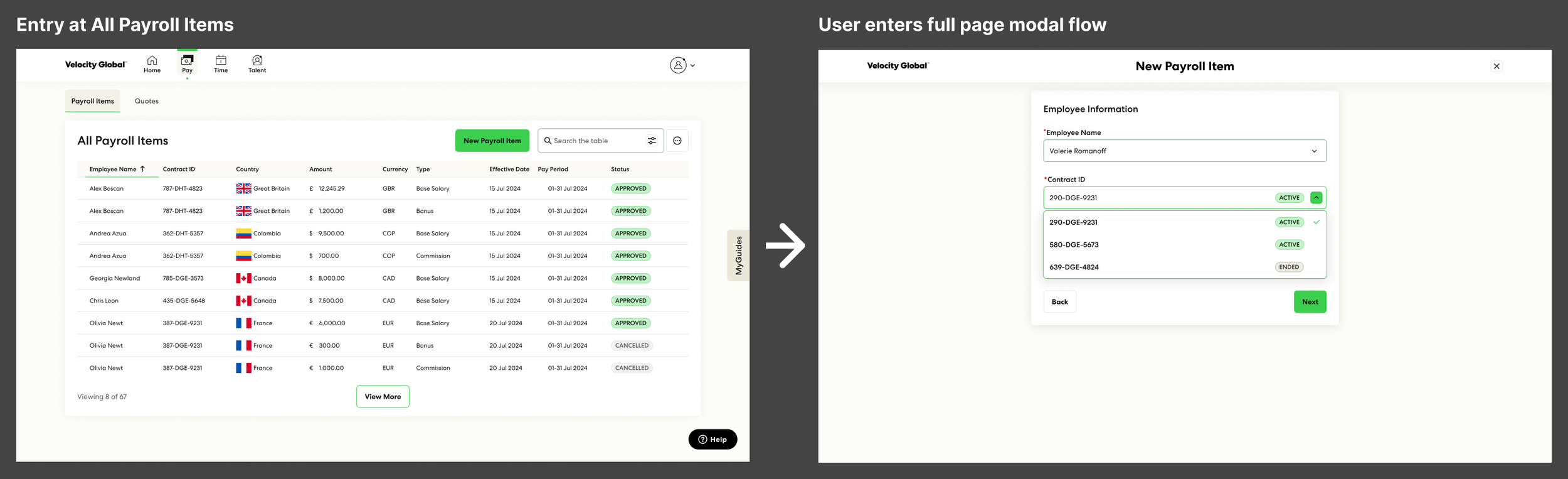
A key shift in the design approach was moving from a small modal to a full-page modal, giving users more space to complete payroll changes in a structured, organized, and scalable interface. This transition allowed for better sectioning, improved usability, and a more intuitive workflow.
Design Concepts
With a clear understanding of the problem space and design principles, I explored multiple approaches to structuring the payroll change workflow. I developed two distinct design concepts—a sequential step-by-step flow and a hub-and-spoke model—each offering different advantages in terms of usability, flexibility, and efficiency.
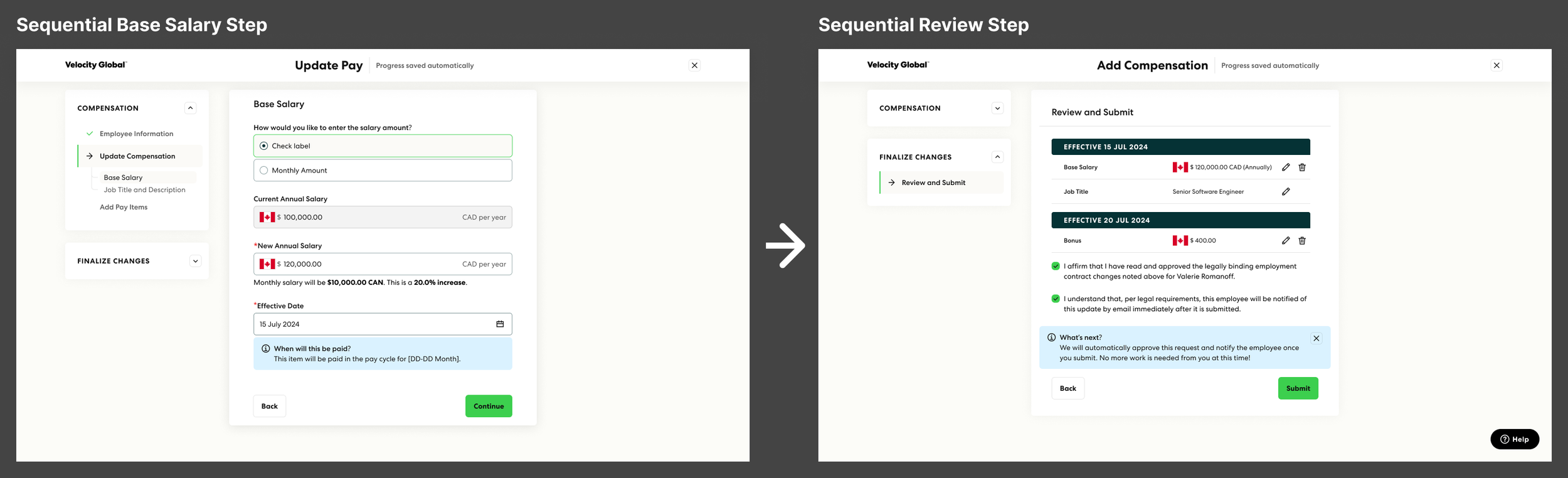
Proposal 1: Sequential Flow with Navigation
Enhancing Visual Hierarchy & Organization
Structured Sections – Clearly separates base salary, job title, and one-time payments, reducing cognitive overload.
Progressive Disclosure – Guides users through the process step-by-step, preventing overwhelming information dumps.
Improved Readability – Larger layout allows for better spacing, typography, and grouping of related payroll elements.
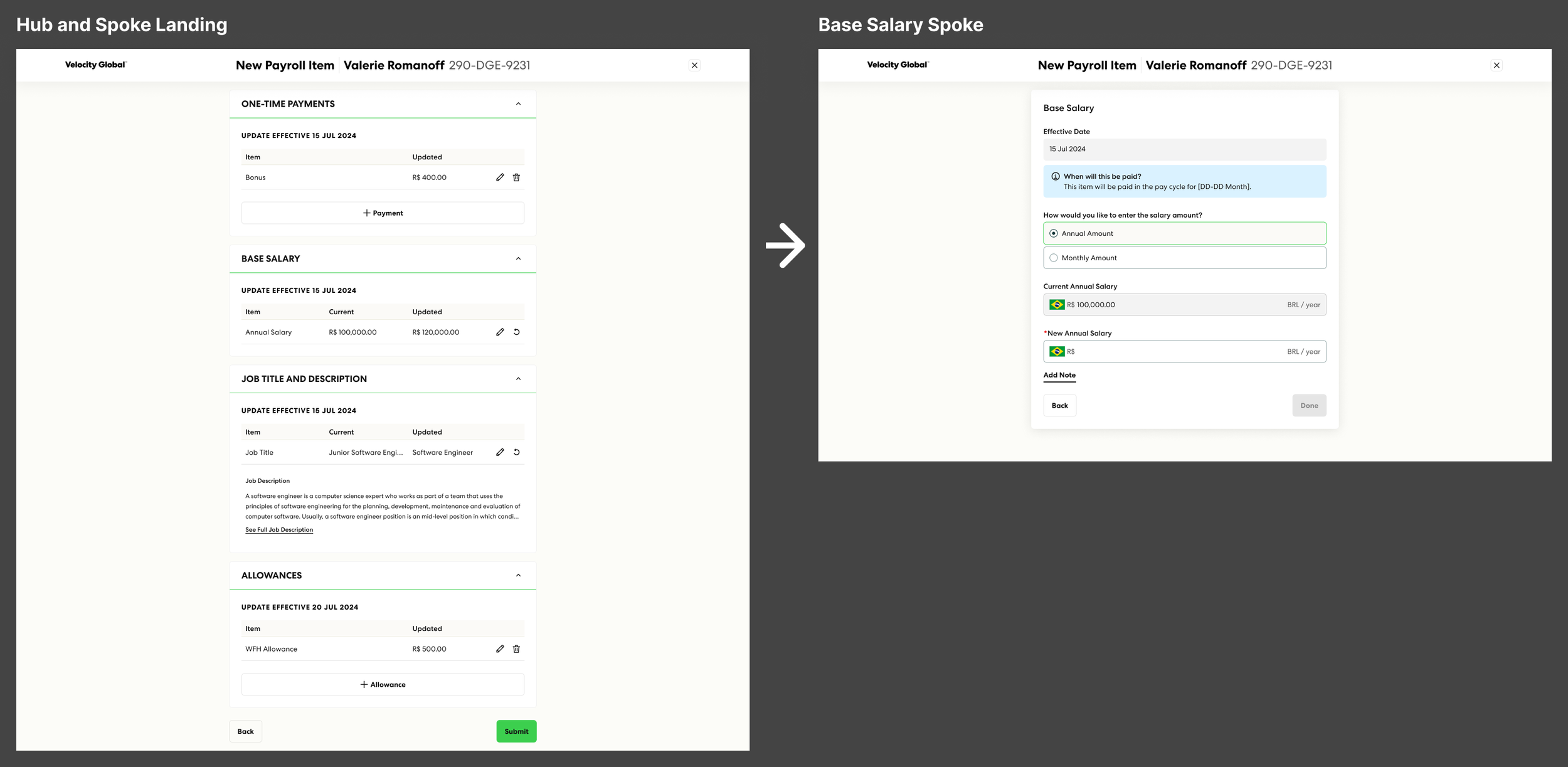
Proposal 2: Hub and Spoke Model
Flexible Navigation and Enhancing Autonomy
Non-Linear Navigation ("Hub & Spoke" Model) – Users can freely move between payroll sections, rather than being forced into a predetermined order.
User-Driven Progression – Users choose how they complete their request, accommodating different work styles.
Maintains Context & Saves Work – Users don’t lose entered data when switching between sections, ensuring a frictionless experience.
User Testing
To evaluate the usability of the new Hub and Spoke model for updating compensation records in the system I partnered with the UX Research team to conduct an unmoderated testing via usertesting.com.
Study Background
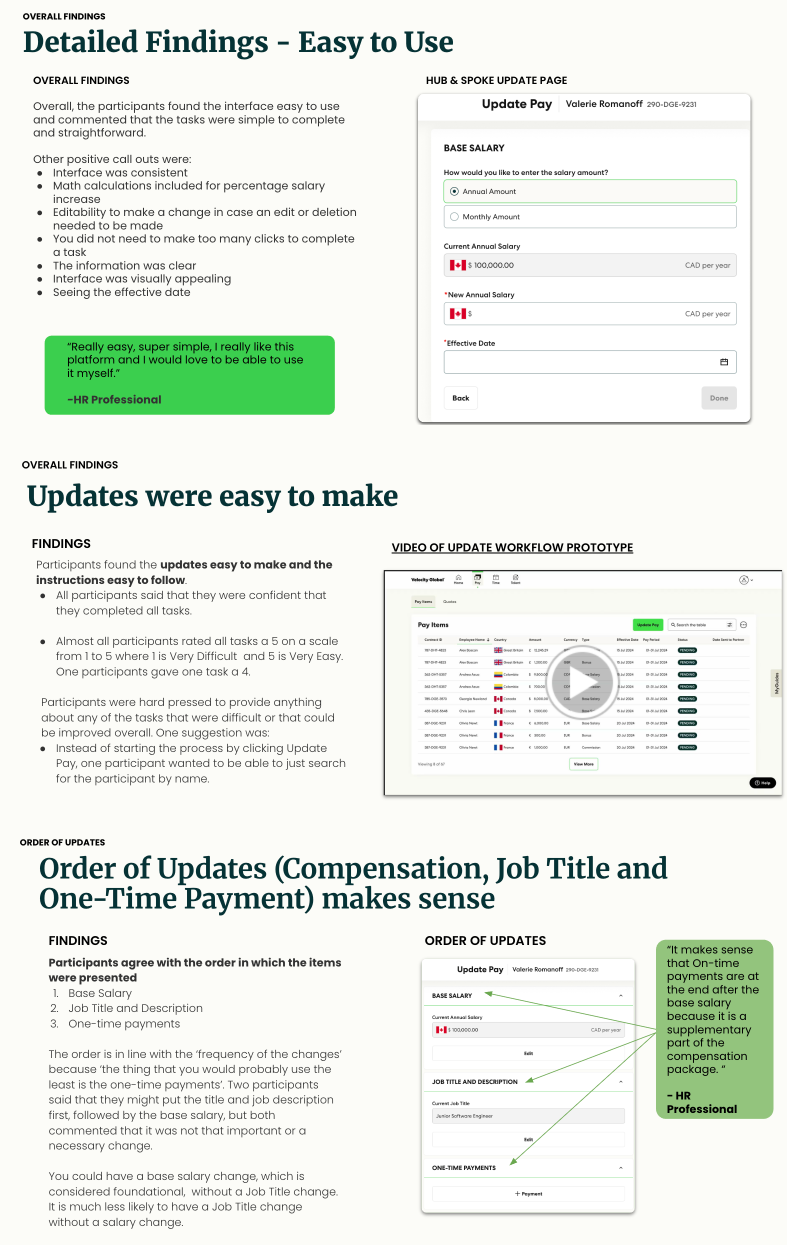
Key Research Questions
How easy is it for HR Managers to update employee compensation records using the Hub & Spoke Model?
Is the new Hub & Spoke model effective for updating employee records?
What is the best order for presenting compensation, job title, and one-time payment updates?
How clear are the affirmation statements, and what additional options are needed>
Recruitment
N=5
Experience Criteria:
Must be currently in a manager position with direct report
Must be currently using a HRIS
Must have experience looking for employees’ payroll information in a HRIS in the past 3 months
Research Findings
V1 Handoff High Level Flow
Next Steps
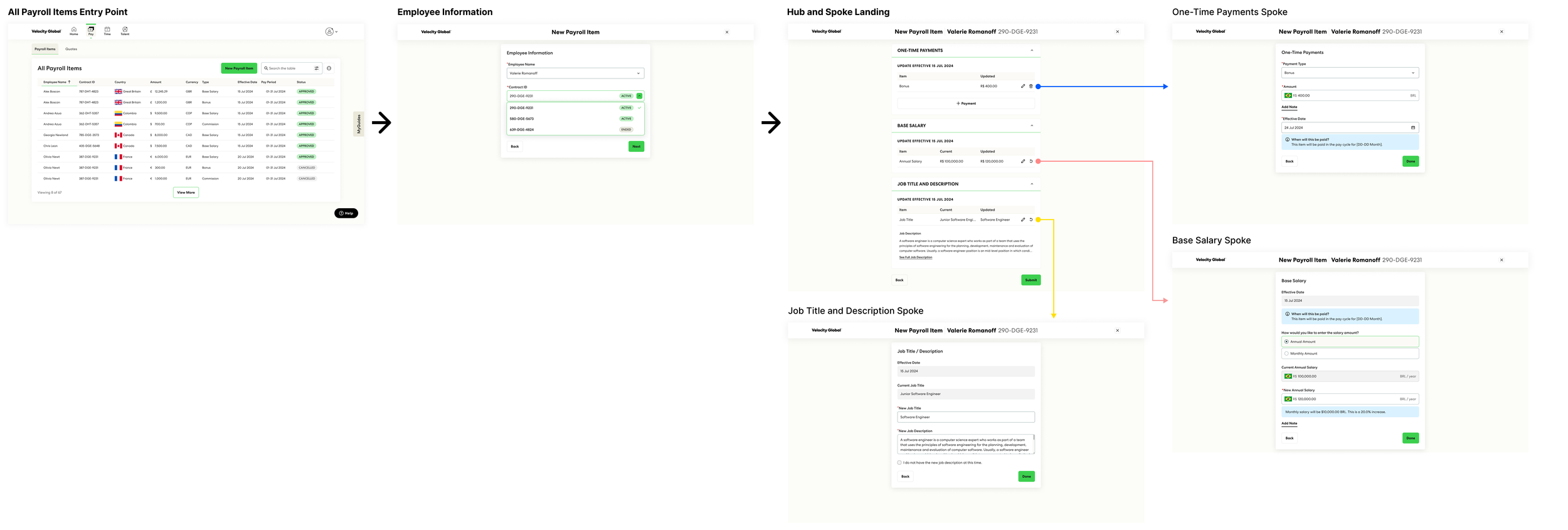
The V1 Hub and Spoke model was handed off to engineering, but it served as just the initial anchor in our long-term vision of simplifying and improving the payroll experience. While V1 addressed immediate user needs with smaller deliverables, the goal was to begin delivering value quickly while leaving room for our future plans. After the initial handoff, I continued working on several key areas to build on the foundation, including:
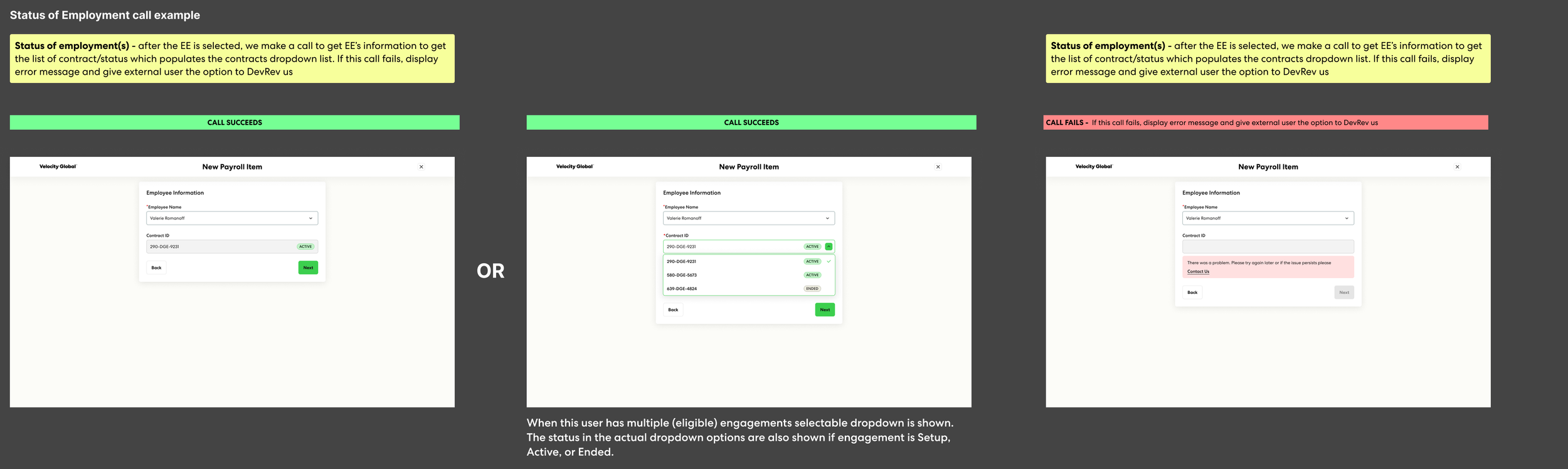
Error Handling
Partnering with engineering to fine-tune error handling and address edge cases.
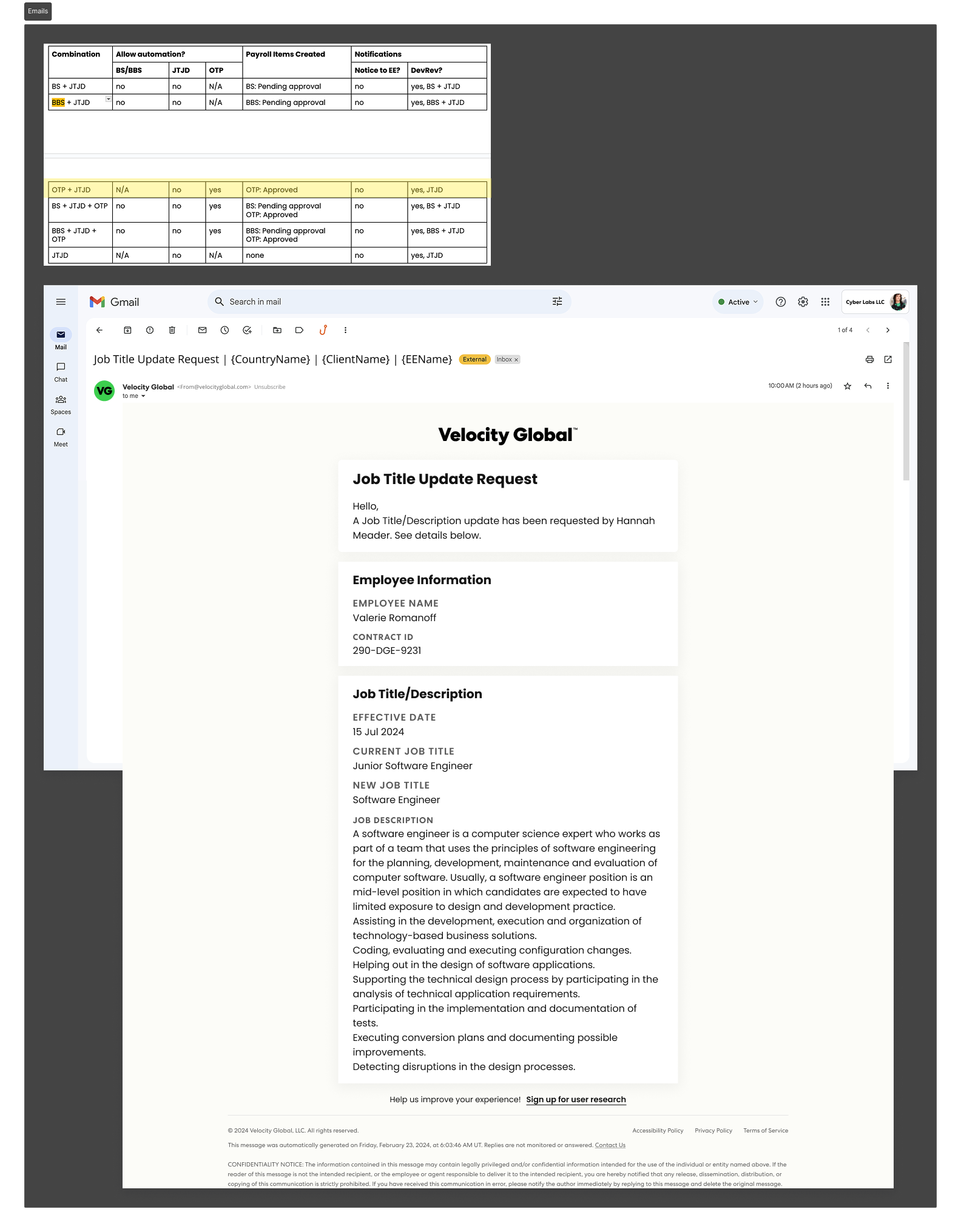
Mapping Multi-Persona Notifications
I partnered again with Product to further map out the unique notifications needed for each user at each step in the request process for each different compensation item request combination.
Account for Bulk Upload and Edit Hourly Pay Rates
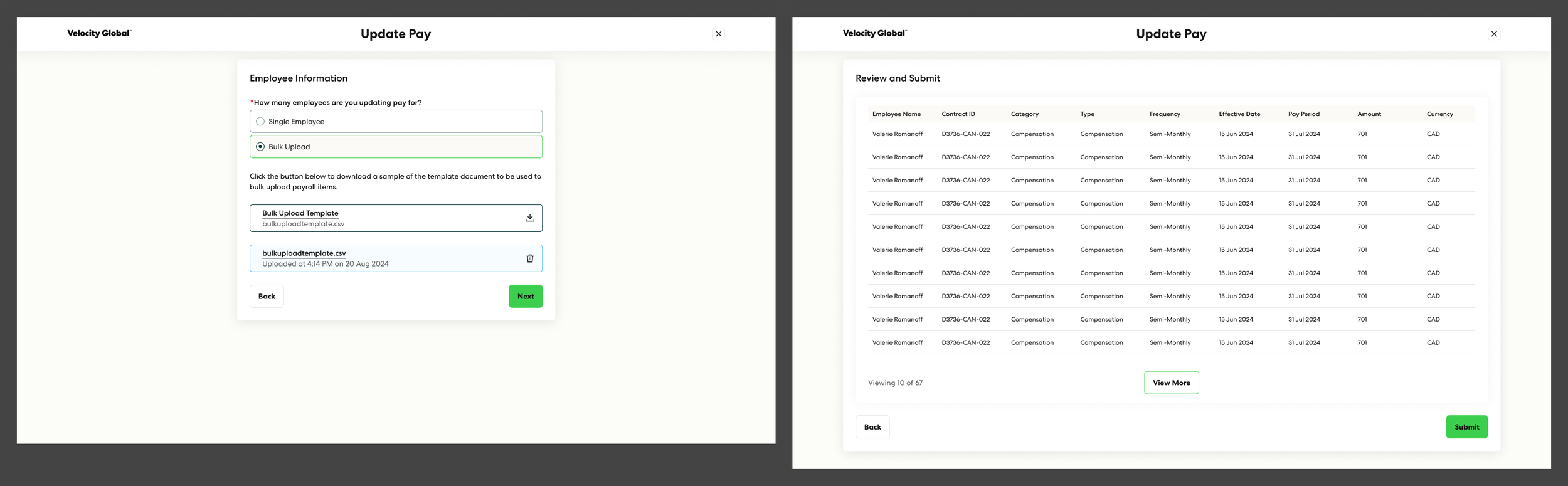
I began initial concepts for bulk salary changes as well as a workflow for updating hourly pay rates (in addition to annual salary).